
All EF roads lead to SQL.

You still own what hits the database

Entity Framework translates LINQ — it does not remove the database from your job. My EF Vibe (efvibe) runs against your real DbContext and shows translated and executed SQL, row counts, and query plans — so you are never guessing what EF actually sent. Use the CLI and editor extensions, or MyEFvibe Studio — a dedicated desktop scratchpad for multi-connection workspaces, notebooks, and team query packs.

v0.6.3 · .NET 8 / 9 / 10 SQL Server · PostgreSQL · SQLite · Oracle · MySQL · Firebird · Couchbase CLI · Studio · VS Code · Rider · efvibe serve Apache 2.0
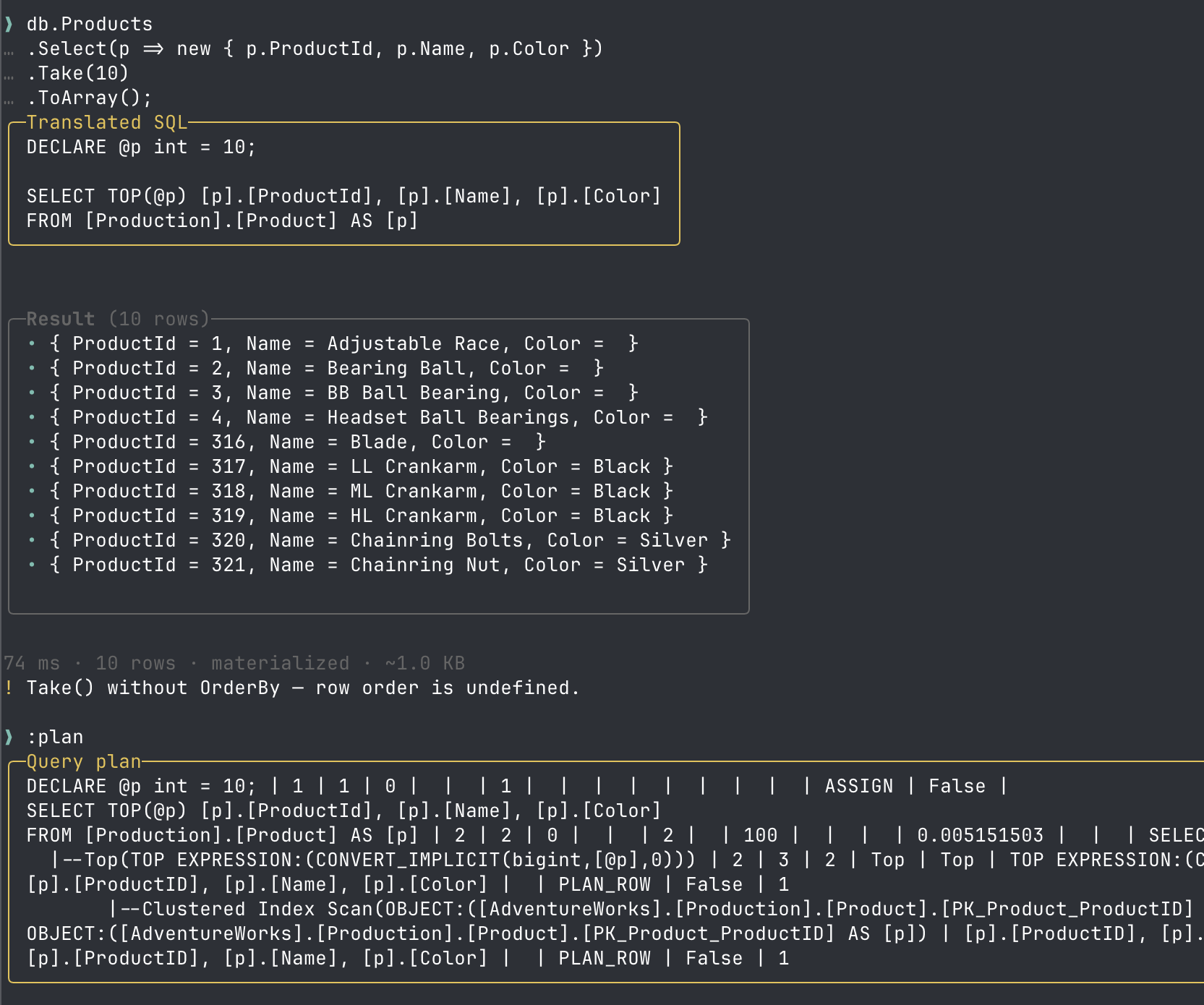
efvibe REPL showing LINQ query, translated SQL, results, and query plan

LINQPad-style, wired to your solution

MyEFvibe Studio

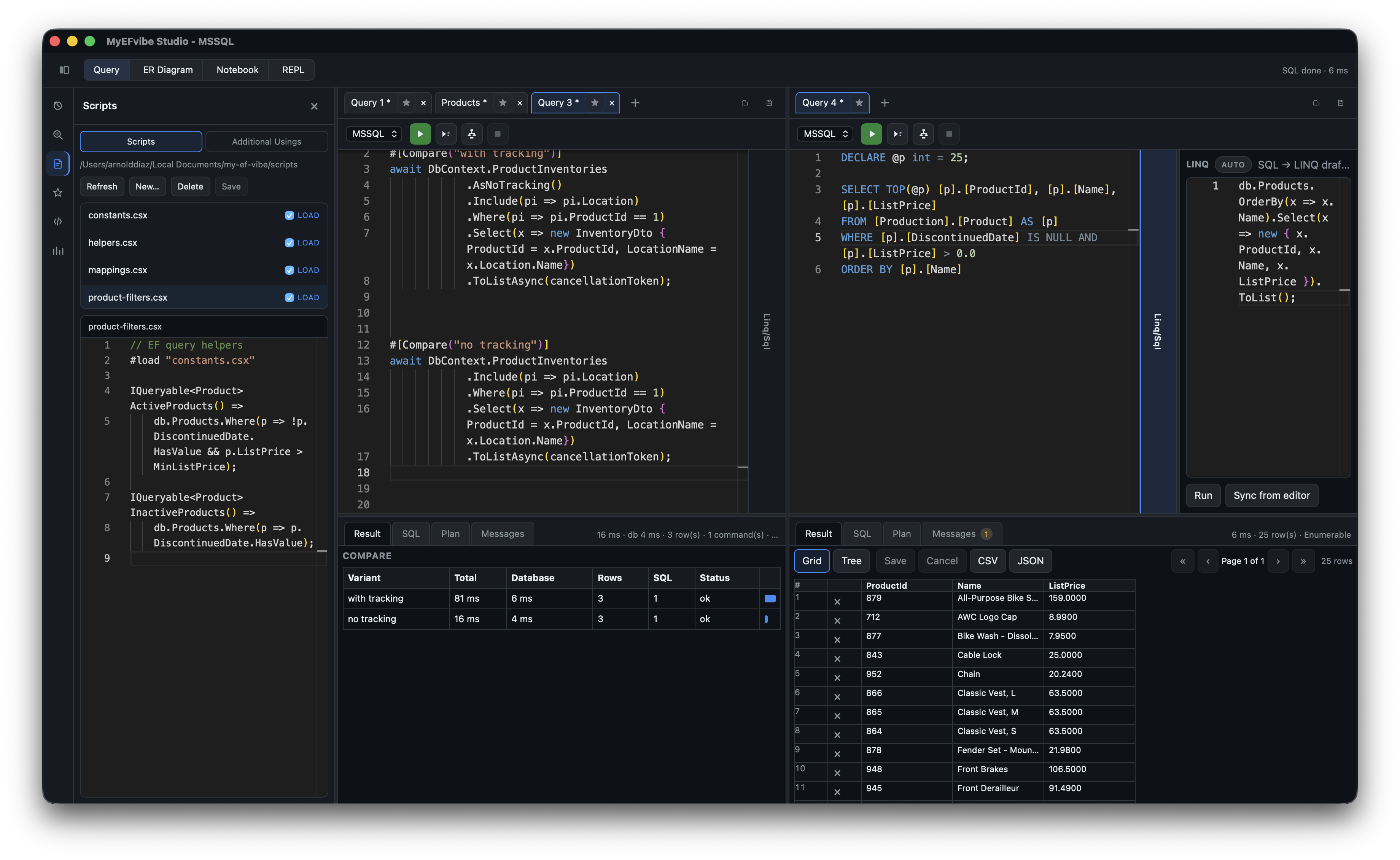
A desktop app for EF Core query work — not a generic SQL client. Studio keeps your EF projects, startup configuration, script helpers, and favorite queries in one .efvibe-workspace file and runs everything through the same efvibe serve engine as the CLI and IDE extensions.

  • Query tabs & notebooks Fluent LINQ, query syntax, or raw SQL — with live SQL preview, plans, and results in one window.
  • Schema & scan Explorer, ER diagrams, lite/deep LINQ scan, and open-in-IDE from findings.
  • Team-ready Snippet packs, favorites sync, and .efvibe-pack export — without sharing connection secrets.
MyEFvibe Studio — query editor, explorer, and results

Why My EF Vibe is essential

There is no way around it: every EF Core query becomes SQL. An ORM buys you mapping and compile-time LINQ — not permission to stop caring about execution plans, round trips, or translated shape.

Teams discover too late that innocent-looking LINQ became N+1 calls, client evaluation, or a table scan. Production does not forgive “I thought EF would optimize that.”

My EF Vibe is the shortest path from the LINQ in your repo to the SQL on the wire — in a REPL, beside your editor, in MyEFvibe Studio, and in CI before merge.

  • See the SQL Translated ToQueryString() and executed commands per snippet — not after a full debug session.
  • Run real LINQ Your project build, your entities, your provider — not a disconnected scratchpad.
  • Prove it in CI efvibe scan flags N+1 and performance smells before they ship.
  • Explain before you tune :plan and deep scan EXPLAIN on the same SQL EF would run in production.

The old way (please stop doing this)

For years, “what SQL did EF send?” meant a scavenger hunt. It works — if you have twenty minutes and excellent scroll speed.

Before efvibe

  1. Turn on EF logging in appsettings (or remember it was already on, but too noisy).
  2. Run the application — API, auth, middleware, health checks, the works.
  3. Watch the logs. Miss the query. Scroll. There it is. Was that the right one?
  4. Copy the SQL from a wall of info lines and parameter blobs.
  5. Paste into SSMS, Azure Data Studio, or “that other tab you had open.”
  6. Run it. Tweak it. Run it again because the app used different parameters.
  7. Analyze the plan. Close the tool. Forget what you learned. Repeat tomorrow.

Seven context switches and a prayer. Per question.

With My EF Vibe

  1. Select the LINQ (or type db.… in the REPL).
  2. Press Run — see translated SQL, executed SQL, rows, and timing.
  3. Optional: Run :plan for EXPLAIN. Optional: fix the LINQ and scan in CI.

Same database truth. No app startup. No log archaeology. No copy-paste relay race.

Imagine how much time your team could have saved if every “what’s the SQL?” moment took seconds instead of a mini sprint. That is what efvibe is for.

What’s new in 0.6

Shipped in the current CLI (efvibe 0.6.x), VS Code extension 0.6.3, and the JetBrains Rider plugin.

Most relational providers

Auto-discover EF packages on -p — SQL Server, PostgreSQL, SQLite, Oracle, MySQL/MariaDB, Firebird, and other *.EntityFrameworkCore.* packages. Couchbase async LINQ is supported when referenced on the EF project.
Oracle AdventureWorks dumps

Native Oracle schemas (PRODUCTION.PRODUCT) are mapped automatically when EF fluent config uses PascalCase — no manual remapping for standard AdventureWorks Oracle imports.

Rider plugin

Full tool window: Run Selection, model actions, scan review, notebooks with Code / Result sub-tabs, CSV/JSON export. Setup guide →

Smarter scan & REPL

Deep scan translates aggregate probes (Count(), Any(), …) to correct SQL; repository snippets with anonymous stats objects and multiple await calls evaluate cleanly in the REPL and editors.

What teams struggle with today

LINQ is pleasant to write and painful to debug when SQL stays invisible. These are the gaps efvibe closes.

?
“What SQL does this LINQ actually run?”

See executed and translated SQL per snippet, with timing and row counts — in the terminal, VS Code, or Rider.

Persistence + API split

Point -p at your EF project and -s at the startup project for user secrets and appsettings — the usual persistence + API split.

Performance smells in repositories

:scan lite and :scan deep walk your EF sources, flag N+1 and client-eval patterns, and show EXPLAIN plans on deep scan.

CI
Gate merges on LINQ quality

Headless efvibe scan with JSON output and --fail-on severity — wire it into PR pipelines (see CI/CD guide).

Product surface

One engine — terminal REPL, efvibe serve daemon, MyEFvibe Studio, VS Code extension, Rider plugin, and CI scan.

MyEFvibe Studio

Desktop LINQ scratchpad — multi-connection workspaces, query tabs, notebooks, script helpers, ER diagrams, and team packs. Overview → · User guide →

Interactive REPL

db.Products.Take(5).ToList(); — history, Tab completion, :tables, :describe, :plan.

Rider plugin

Per-project settings, Run Selection, model actions, scan review, notebooks, and result exports. Setup guide →

LINQ scan

Lite heuristics plus deep scan with ToQueryString() and live EXPLAIN per call site.

Session artifacts

Scan JSON, dismissals, notes, and CSV/JSON exports under ~/.efvibe/<Project>/<DbContext>/.

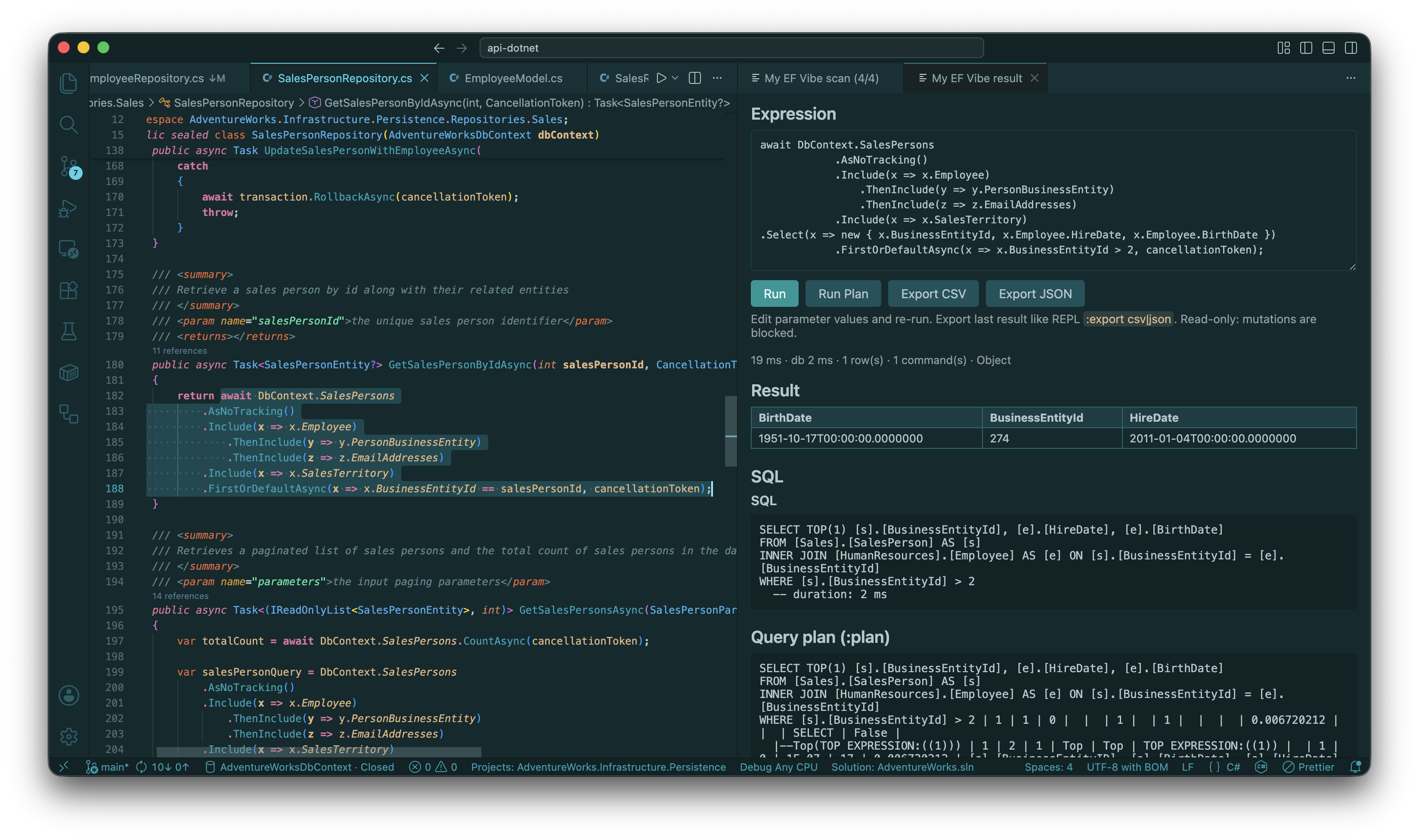
VS Code extension with split result and SQL panel
VS Code — Run Selection with JSON evaluation and SQL beside your editor